How to Make DTF Transfers Feel More Like Screen Printing
DTF shouldn’t feel like a piece of plastic loosely slapped onto a shirt. While DTF and screen printing will never feel exactly the same, the right transfer, artwork, pressure, pre-press and most importantly the post-press can create a professional finish that feels securely bonded to the garment.
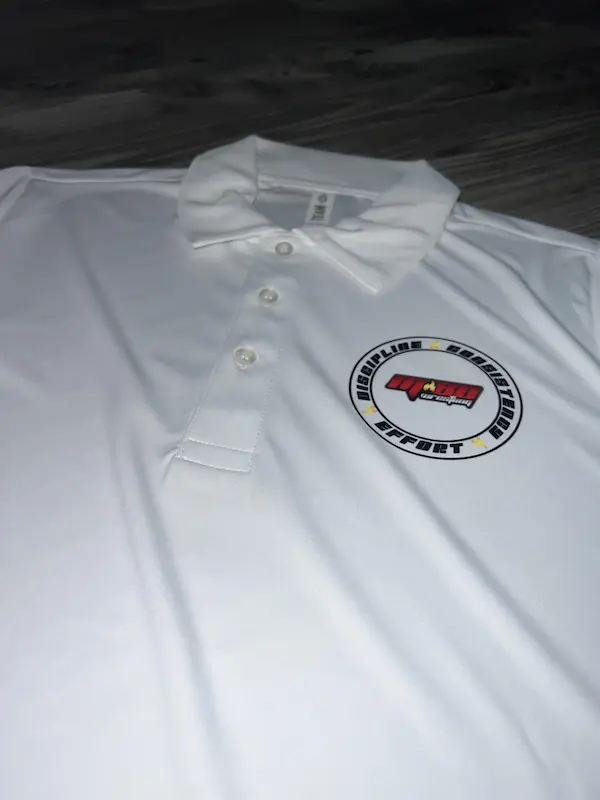
One of the biggest complaints you’ll hear about Direct-to-Film printing is some version of this:
“DTF feels like plastic on the shirt.”
And sometimes? That’s a fair criticism.
A giant solid transfer made with a thick ink and adhesive layer, applied poorly and peeled without any finishing step can have a very different hand feel from a well-made screen print.
But that doesn’t mean all DTF has to feel that way.
At Hollywood Prints, we’ve found that one of the most overlooked steps happens after you peel the transfer. A proper post-press can make a noticeable difference in how finished DTF feels and how confidently the transfer appears bonded to the garment.
It’s a simple step. It doesn’t require another expensive product. And it’s one of the first things we recommend to customers who want the best possible finish from our custom DTF transfers.
TL;DR: Want Better-Feeling DTF? Post-Press It.
DTF will not feel exactly like screen printing because they’re different printing processes. However, quality DTF should feel securely bonded to the garment rather than like a cheap plastic sticker waiting to peel off.
Our biggest tip at Hollywood Prints is simple: don’t stop after the first press and peel.
After peeling our SMARTPEEL Technology transfer, we recommend a second press at 300–310°F for approximately 10 seconds.
Cover the design with a Teflon sheet, parchment paper, or a compatible silicone DTF finishing sheet during the post-press. We personally use Teflon. This extra step has consistently given our customers a more secure, finished feel without requiring them to purchase a special finishing product.
Can DTF Transfers Really Feel Like Screen Printing?
Let’s set the right expectation first.
DTF and screen printing are different decoration methods, so you should not expect them to feel identical.
Screen printing deposits ink through a mesh screen onto the garment. Depending on the ink system, mesh, artwork and number of passes, a screen print can range from extremely soft to noticeably thick.
DTF works differently. The artwork is printed onto film, adhesive is applied, the transfer is cured, and the completed image is heat applied to the garment.
That naturally creates a different hand feel.
But there is an enormous difference between saying “DTF has a different hand than screen printing” and saying “DTF should feel like a cheap plastic sticker.”
Good DTF can feel smooth, flexible and securely integrated with the texture of the garment. When properly applied, it should look and feel like a professional apparel decoration method because that’s exactly what it is.
Why Do Some DTF Transfers Feel Like Plastic?
There isn’t one universal reason.
The finished feel is the result of several variables working together:
- The transfer film and ink system
- The amount and type of adhesive
- The white ink layer
- The size of the design
- How much solid ink coverage the artwork contains
- The garment itself
- Press temperature
- Pressure
- Press time
- Whether the transfer receives a finishing press
That last point is one that we believe gets underestimated.
Especially among new decorators, hobbyists, Etsy sellers, and people who have just started pressing their own transfers, the process sometimes becomes:
Put transfer down → press → peel → finished.
Technically, you may have a successfully applied transfer.
But successfully attached and professionally finished aren’t necessarily the same thing.
Post-Press Your DTF Transfers
If there’s one tip we want you to take away from this guide, it’s this:
Post-press your transfer after you peel it.
For Hollywood Prints SMARTPEEL Technology transfers, we recommend a second press at 300–310°F for approximately 10 seconds after removing the carrier film.
Place a protective cover between the exposed transfer and your heat press before performing this second press.
We personally use a Teflon sheet, but parchment paper works as well. Silicone DTF finishing sheets are another option.
In our experience, this additional finishing step gives the transfer a more secure, finished feel and helps the surface conform better to the texture of the garment. It’s a small addition to the workflow that our customers have responded very positively to.
How to Post-Press a DTF Transfer
The process is simple. Remember that these settings are specifically our recommendation for Hollywood Prints SMARTPEEL Technology transfers. If you’re using another manufacturer’s transfer, follow its application instructions.
Complete Your Initial Press
Apply your Hollywood Prints transfer according to the pressing instructions supplied with your order.
Peel the Carrier
Peel the film according to the instructions for your transfer. Once peeled, the printed design itself will be exposed.
Cover the Design
Place a clean Teflon sheet, parchment paper, or compatible silicone finishing sheet over the entire transfer.
Press Again
For Hollywood Prints SMARTPEEL transfers, post-press at 300–310°F for approximately 10 seconds.
Teflon vs. Parchment vs. Silicone: What Should You Use for the Post-Press?
You have several options, and you don’t necessarily need to buy something new.
| Cover Material | Can You Use It? | Why We Like It |
|---|---|---|
| Teflon Sheet | Yes | Reusable, convenient and the method we commonly use at Hollywood Prints. |
| Parchment Paper | Yes | Simple and accessible. Many decorators already have it available. |
| Silicone DTF Sheet | Yes | Made specifically for heat-transfer finishing and can produce a different surface finish depending on the sheet. |
The important thing is that you’re not pressing your exposed transfer directly against the upper platen.
Use a clean protective sheet that can tolerate your pressing temperature.
Don’t Underestimate the DTF Pre-Press Either
The post-press gets most of our attention in this guide, but the pre-press deserves some love too.
A brief pre-press before positioning your transfer can help create a cleaner starting surface.
Depending on the garment and environment, pre-pressing can help:
- Flatten wrinkles in the print area
- Remove excess moisture from the garment
- Give you a more consistent pressing surface
- Prepare the garment before positioning the transfer
This is especially relevant with cotton, which can retain moisture from its environment.
Is a pre-press always absolutely required for every shirt?
No.
But when we’re chasing the best possible finished product rather than merely asking whether the transfer will stick, small production habits matter.
That’s why we think both ends of the pressing process are underestimated: prepare the garment before the transfer and finish the garment after the transfer.
If you’re working primarily with cotton blanks, read our guide to using DTF transfers on cotton .
Your Artwork Has a Huge Effect on How DTF Feels
Here’s something no amount of post-pressing can completely fix:
A giant solid rectangle is still a giant solid rectangle.
Imagine two designs.
The first is an 11-inch-wide photograph printed as one solid rectangular block.
The second uses distressed lettering, negative space, separated elements and open areas where the shirt remains exposed.
Even if they’re produced with the exact same transfer system and pressed onto the exact same shirt, they’re not going to feel identical.
The second design has less material covering the garment.
Use Negative Space
If softness is a priority, let the shirt become part of the design.
Transparent areas in your artwork allow the underlying garment to remain exposed rather than covering the entire print area with ink and adhesive.
Avoid Unnecessary Backgrounds
If your logo doesn’t need a solid square background, remove it.
This is one reason properly prepared transparent PNG artwork can be so useful for DTF.
Think About Print Size
A 3-inch chest logo and a 12-inch solid full-front print naturally create very different amounts of surface coverage.
Bigger isn’t automatically better.
If you need help preparing artwork before ordering, you can also build your layout with our DTF Gang Sheet Builder .
Pressure Matters More Than Many Beginners Realize
Temperature gets most of the attention in heat-press tutorials.
People obsess over whether the press says 305°F, 310°F or 315°F.
But your heat press isn’t just a heater.
It’s a press.
The adhesive needs consistent contact with the garment. If one section of your design receives proper pressure while another section is sitting over a thick seam or collar, your finished application can be inconsistent.
Watch for:
- Collars
- Side seams
- Pockets
- Zippers
- Hoodie drawstrings
- Buttons
- Thick garment folds
Make sure the actual print area is as flat and evenly supported as possible.
What About MagicSeal and Other DTF Finishing Products?
You may have seen specialized DTF finishing products such as MagicSeal discussed online. Some decorators report that they like the results these types of products provide.
We’re not here to tell you that nobody should use them.
Our recommendation at Hollywood Prints is simply more practical:
Try a proper post-press first.
Why?
Because you may already own everything you need.
If you have a heat press and a Teflon sheet or parchment paper, you can add a finishing press to your existing workflow without buying another consumable just to see whether it improves your results.
If you later decide that you prefer the texture or finish created by a specialty sheet, that’s a production choice you can test for yourself.
We simply don’t believe you need another product before you’ve tried the basics correctly.
DTF vs. Screen Printing: How Do They Actually Feel?
| Characteristic | Quality DTF | Screen Printing |
|---|---|---|
| Feel | Smooth and flexible but generally has a distinct transfer layer | Varies greatly depending on ink, artwork and print technique |
| Large Solid Designs | Can feel heavier because more transfer material covers the garment | Can also feel heavier depending on ink deposit and artwork |
| Fine Full-Color Detail | Excellent | Possible, but typically requires a more involved print setup |
| Small Quantities | Excellent | Setup can make very small quantities less practical |
| Post-Press | Recommended by Hollywood Prints for our transfers | Not the same workflow |
| Best Description | A securely bonded transfer with a smooth professional finish | Ink printed directly onto the garment |
So should somebody sell you DTF by claiming it is literally indistinguishable from every screen print?
No.
That’s an unnecessary promise.
Instead, good DTF should stand on its own merits: excellent color, detailed artwork, flexibility across order quantities and garment types, and a high-quality finished application when produced and pressed correctly.
Does Post-Pressing Make DTF More Durable?
A correct application is what matters most for durability. The transfer needs the proper combination of heat, time and pressure during its primary application.
We don’t recommend using a post-press as a way to compensate for an incorrectly applied transfer.
Instead, think of it as the finishing step.
At Hollywood Prints, our customers have told us that transfers feel more secure after the second press, and that’s consistent with why we’ve made post-pressing part of our recommended application workflow.
The transfer should not look like something that is simply waiting to peel away from the shirt.
It should feel intentionally applied, finished and ready to wear.
The Hollywood Prints SMARTPEEL Finishing Recipe
If you’re using Hollywood Prints SMARTPEEL Technology transfers and want the finish we recommend, don’t stop after peeling.
Complete the normal application and peel first. Then cover the exposed design and perform this finishing press.
Our Recommended Workflow for Professional-Looking DTF
If you’re selling shirts rather than making a single project at home, consistency matters.
- Start with good artwork. Avoid unnecessary solid backgrounds when softness matters.
- Use a quality transfer. Your finishing technique can’t completely compensate for poor printing or adhesive.
- Inspect the garment. Make sure the print area is clean, flat and suitable for pressing.
- Pre-press when appropriate. Flatten wrinkles and remove excess moisture.
- Position carefully. Measure instead of guessing when consistency matters.
- Use the correct initial press settings. Follow the instructions for your specific transfer.
- Peel correctly. Follow the required peel method for the film.
- Post-press. For Hollywood Prints SMARTPEEL transfers, use 300–310°F for about 10 seconds with a protective sheet.
- Inspect the finished garment. Don’t ship something you wouldn’t be happy receiving yourself.
If you’re new to DTF, our complete DTF application instructions provide additional guidance for applying your transfers.
Frequently Asked Questions About Making DTF Feel Better
Why does my DTF transfer feel like plastic?
Some surface feel is normal because DTF is a transfer process, but an especially heavy or plasticky result can be influenced by the transfer itself, large areas of solid artwork, adhesive and ink coverage, garment choice, pressure, application settings and finishing technique. Using negative space and properly post-pressing the transfer can help create a more professional finished feel.
Can DTF transfers feel like screen printing?
DTF and screen printing are different processes and will not feel exactly the same. However, a quality DTF transfer that is correctly applied and post-pressed can have a smooth, flexible and securely bonded finish rather than feeling like a loose plastic sticker sitting on the garment.
Should you post-press DTF transfers?
Hollywood Prints recommends post-pressing our SMARTPEEL Technology transfers after peeling. We find that the finishing press produces a more secure and professionally finished result. Always follow the instructions supplied by the manufacturer when using transfers from another source.
What temperature should I post-press DTF?
For Hollywood Prints SMARTPEEL Technology transfers, we recommend a post-press at 300–310°F for approximately 10 seconds after peeling, using a Teflon sheet, parchment paper, or compatible silicone finishing sheet over the transfer.
How long should I post-press a DTF transfer?
Hollywood Prints recommends approximately 10 seconds for the finishing press on our SMARTPEEL Technology transfers. Other transfer systems may require different settings, so use the instructions supplied with your transfers.
Can I use parchment paper to post-press DTF?
Yes. Parchment paper can be used as a protective cover during the finishing press. Hollywood Prints commonly uses a Teflon sheet, while compatible silicone DTF finishing sheets are another option.
Do I need a silicone finishing sheet for DTF?
Not necessarily. Silicone finishing sheets can be useful, but Hollywood Prints recommends trying a proper post-press with a suitable Teflon sheet or parchment paper if you already have one. This lets you improve your finishing process without necessarily purchasing another product.
Do I need MagicSeal for DTF transfers?
No. Specialty finishing products are optional. Some decorators report liking them, but Hollywood Prints recommends first dialing in your normal application and post-press workflow. Our SMARTPEEL transfers can be post-pressed using common protective materials such as Teflon or parchment paper.
Does pre-pressing matter for DTF?
A brief pre-press can be helpful for flattening wrinkles and removing excess moisture from the print area, particularly with cotton garments. It is a preparation step rather than a substitute for correct transfer application.
How can I make a large DTF print feel softer?
Artwork design is important. Whenever the design allows it, use negative space, transparent backgrounds, separated graphic elements and less unnecessary solid coverage. A large solid print naturally covers more of the garment and can feel heavier than an open design.
Will post-pressing fix a DTF transfer that did not stick?
A post-press should not be treated as a fix for an incorrectly applied transfer. If significant portions failed to adhere, first investigate temperature, pressure, press time, seams, moisture and the required peel method. The finishing press works best as part of a correct application process.
Final Thoughts: Don’t Stop at Press, Peel, Done
If you want DTF transfers that feel more like screen printing, the goal shouldn’t be to pretend the two processes are identical.
They’re not.
The goal is to make the best DTF shirt possible.
Start with quality transfers. Prepare the garment. Use the correct heat and pressure. Design artwork intelligently.
And then take the extra 10 seconds.
Post-press your transfer.
It’s one of the simplest improvements you can make to your DTF workflow, and for Hollywood Prints SMARTPEEL Technology transfers, it’s the finishing step we recommend to customers who want that secure, high-quality feel.
You don’t necessarily need a new finishing product, another machine, or another expensive consumable.
Sometimes the biggest improvement is simply getting more out of the equipment and materials you already have.
Ready to try it? Order custom DTF transfers from Hollywood Prints and don’t forget the post-press.